TikTok Project
Dinh Manh Tuan - November 2025
This project is a case study in the Google Advanced Data Analytics Certificate on Coursera. The objective is to classify whether a post on TikTok is whether a claim or an opinion video based on extracted features. To do this, we use a dataset provided by Google with more than 19000 records to use for our Logistic Regression and Machine Learning models
The skill I acquired included:
- Python programming,
- Exploratory Data Analysis (EDA), data visualization (seaborn, matplotlib)
- Statistical testing,
- Regression model building,
- Machine Learning models (Random Forest, XGBoost).
Data Dictionary
Table 1. Tiktok Dataset Dictionary
| Column name | Type | Description |
|---|---|---|
# |
int | TikTok assigned number for the video with claim/opinion. |
claim_status |
object | Whether the published video is identified as an opinion or claim. An opinion refers to an individual's or group’s personal belief or thought. A claim refers to information that is unsourced or from an unverified source. |
video_id |
int | Random identifying number assigned to the video upon publication on TikTok. |
video_duration_sec |
int | The duration of the published video in seconds. |
video_transcription_text |
object | Transcribed text of the words spoken in the video. |
verified_status |
object | Indicates whether the TikTok user who published the video is verified or not verified. |
author_ban_status |
object | Indicates the user’s permission status: active, under scrutiny, or banned. |
video_view_count |
float | The number of times the video has been viewed. |
video_like_count |
float | The number of times the video has been liked by other users. |
video_share_count |
float | The number of times the video has been shared by other users. |
video_download_count |
float | The number of times the video has been downloaded by users. |
1. Exploratory Data Analysis (EDA)
First, we import the necessary packages
# Packages for data manipulation
import numpy as np
import pandas as pd
import seaborn as sns
import matplotlib.pyplot as plt
import pickle
from scipy import stats

# Packages for data processing and ML
from sklearn.preprocessing import OneHotEncoder
from sklearn.feature_extraction.text import CountVectorizer, TfidfVectorizer
from sklearn.linear_model import LogisticRegression
from sklearn.model_selection import train_test_split, PredefinedSplit, GridSearchCV
from sklearn import metrics
from sklearn.metrics import f1_score, precision_score, recall_score, accuracy_score, confusion_matrix, ConfusionMatrixDisplay, classification_report
from xgboost import XGBClassifier, plot_importance
from sklearn.ensemble import RandomForestClassifier as RFC
from sklearn.utils import resample
#Read and preview the csv file
data = pd.read_csv("tiktok_dataset.csv")
data.head(10)
| # | claim_status | video_id | video_duration_sec | video_transcription_text | verified_status | author_ban_status | video_view_count | video_like_count | video_share_count | video_download_count | video_comment_count | |
|---|---|---|---|---|---|---|---|---|---|---|---|---|
| 0 | 1 | claim | 7017666017 | 59 | someone shared with me that drone deliveries a... | not verified | under review | 343296.0 | 19425.0 | 241.0 | 1.0 | 0.0 |
| 1 | 2 | claim | 4014381136 | 32 | someone shared with me that there are more mic... | not verified | active | 140877.0 | 77355.0 | 19034.0 | 1161.0 | 684.0 |
| 2 | 3 | claim | 9859838091 | 31 | someone shared with me that american industria... | not verified | active | 902185.0 | 97690.0 | 2858.0 | 833.0 | 329.0 |
| 3 | 4 | claim | 1866847991 | 25 | someone shared with me that the metro of st. p... | not verified | active | 437506.0 | 239954.0 | 34812.0 | 1234.0 | 584.0 |
| 4 | 5 | claim | 7105231098 | 19 | someone shared with me that the number of busi... | not verified | active | 56167.0 | 34987.0 | 4110.0 | 547.0 | 152.0 |
| 5 | 6 | claim | 8972200955 | 35 | someone shared with me that gross domestic pro... | not verified | under review | 336647.0 | 175546.0 | 62303.0 | 4293.0 | 1857.0 |
| 6 | 7 | claim | 4958886992 | 16 | someone shared with me that elvis presley has ... | not verified | active | 750345.0 | 486192.0 | 193911.0 | 8616.0 | 5446.0 |
| 7 | 8 | claim | 2270982263 | 41 | someone shared with me that the best selling s... | not verified | active | 547532.0 | 1072.0 | 50.0 | 22.0 | 11.0 |
| 8 | 9 | claim | 5235769692 | 50 | someone shared with me that about half of the ... | not verified | active | 24819.0 | 10160.0 | 1050.0 | 53.0 | 27.0 |
| 9 | 10 | claim | 4660861094 | 45 | someone shared with me that it would take a 50... | verified | active | 931587.0 | 171051.0 | 67739.0 | 4104.0 | 2540.0 |
data.info()
<class 'pandas.core.frame.DataFrame'>
RangeIndex: 19382 entries, 0 to 19381
Data columns (total 12 columns):
 #   Column                    Non-Null Count  Dtype
---  ------                    --------------  -----
 0   #                         19382 non-null  int64
 1   claim_status              19084 non-null  object
 2   video_id                  19382 non-null  int64
 3   video_duration_sec        19382 non-null  int64
 4   video_transcription_text  19084 non-null  object
 5   verified_status           19382 non-null  object
 6   author_ban_status         19382 non-null  object
 7   video_view_count          19084 non-null  float64
 8   video_like_count          19084 non-null  float64
 9   video_share_count         19084 non-null  float64
 10  video_download_count      19084 non-null  float64
 11  video_comment_count       19084 non-null  float64
dtypes: float64(5), int64(3), object(4)
memory usage: 1.8+ MB
data.describe()
| # | video_id | video_duration_sec | video_view_count | video_like_count | video_share_count | video_download_count | video_comment_count | |
|---|---|---|---|---|---|---|---|---|
| count | 19382.000000 | 1.938200e+04 | 19382.000000 | 19084.000000 | 19084.000000 | 19084.000000 | 19084.000000 | 19084.000000 |
| mean | 9691.500000 | 5.627454e+09 | 32.421732 | 254708.558688 | 84304.636030 | 16735.248323 | 1049.429627 | 349.312146 |
| std | 5595.245794 | 2.536440e+09 | 16.229967 | 322893.280814 | 133420.546814 | 32036.174350 | 2004.299894 | 799.638865 |
| min | 1.000000 | 1.234959e+09 | 5.000000 | 20.000000 | 0.000000 | 0.000000 | 0.000000 | 0.000000 |
| 25% | 4846.250000 | 3.430417e+09 | 18.000000 | 4942.500000 | 810.750000 | 115.000000 | 7.000000 | 1.000000 |
| 50% | 9691.500000 | 5.618664e+09 | 32.000000 | 9954.500000 | 3403.500000 | 717.000000 | 46.000000 | 9.000000 |
| 75% | 14536.750000 | 7.843960e+09 | 47.000000 | 504327.000000 | 125020.000000 | 18222.000000 | 1156.250000 | 292.000000 |
| max | 19382.000000 | 9.999873e+09 | 60.000000 | 999817.000000 | 657830.000000 | 256130.000000 | 14994.000000 | 9599.000000 |
1.1. Investigate the variables
A first step towards understanding the data might therefore be examining the claim_status variable. Begin by determining how many videos there are for each different claim status.
# Check missing data
data.isna().sum()
#                             0
claim_status                298
video_id                      0
video_duration_sec            0
video_transcription_text    298
verified_status               0
author_ban_status             0
video_view_count            298
video_like_count            298
video_share_count           298
video_download_count        298
video_comment_count         298
dtype: int64
# Remove missing data
data = data.dropna(axis = 0)
data.head()
| # | claim_status | video_id | video_duration_sec | video_transcription_text | verified_status | author_ban_status | video_view_count | video_like_count | video_share_count | video_download_count | video_comment_count | |
|---|---|---|---|---|---|---|---|---|---|---|---|---|
| 0 | 1 | claim | 7017666017 | 59 | someone shared with me that drone deliveries a... | not verified | under review | 343296.0 | 19425.0 | 241.0 | 1.0 | 0.0 |
| 1 | 2 | claim | 4014381136 | 32 | someone shared with me that there are more mic... | not verified | active | 140877.0 | 77355.0 | 19034.0 | 1161.0 | 684.0 |
| 2 | 3 | claim | 9859838091 | 31 | someone shared with me that american industria... | not verified | active | 902185.0 | 97690.0 | 2858.0 | 833.0 | 329.0 |
| 3 | 4 | claim | 1866847991 | 25 | someone shared with me that the metro of st. p... | not verified | active | 437506.0 | 239954.0 | 34812.0 | 1234.0 | 584.0 |
| 4 | 5 | claim | 7105231098 | 19 | someone shared with me that the number of busi... | not verified | active | 56167.0 | 34987.0 | 4110.0 | 547.0 | 152.0 |
# What are the different values for claim status and how many of each are in the data?
data['claim_status'].value_counts()
claim_status
claim      9608
opinion    9476
Name: count, dtype: int64
# What is the average view count of videos with "claim" status?
claims = data[data['claim_status'] == 'claim']
print('Mean view count claims:', claims['video_view_count'].mean())
print('Median view count claims:', claims['video_view_count'].median())

# What is the average view count of videos with "opinion" status?
opinions = data[data['claim_status'] == 'opinion']
print('Mean view count opinions:', opinions['video_view_count'].mean())
print('Median view count opinions:', opinions['video_view_count'].median())
Mean view count claims: 501029.4527477102
Median view count claims: 501555.0
Mean view count opinions: 4956.43224989447
Median view count opinions: 4953.0
# Get counts for each group combination of claim status and author ban status
data.groupby(['claim_status', 'author_ban_status']).count()[['#']]
| # | ||
|---|---|---|
| claim_status | author_ban_status | |
| claim | active | 6566 |
| banned | 1439 | |
| under review | 1603 | |
| opinion | active | 8817 |
| banned | 196 | |
| under review | 463 |
data.groupby(['author_ban_status']).agg(
    {'video_view_count': ['count', 'mean', 'median'],
     'video_like_count': ['count', 'mean', 'median'],
     'video_share_count': ['count', 'mean', 'median']
     })
| video_view_count | video_like_count | video_share_count | |||||||
|---|---|---|---|---|---|---|---|---|---|
| count | mean | median | count | mean | median | count | mean | median | |
| author_ban_status | |||||||||
| active | 15383 | 215927.039524 | 8616.0 | 15383 | 71036.533836 | 2222.0 | 15383 | 14111.466164 | 437.0 |
| banned | 1635 | 445845.439144 | 448201.0 | 1635 | 153017.236697 | 105573.0 | 1635 | 29998.942508 | 14468.0 |
| under review | 2066 | 392204.836399 | 365245.5 | 2066 | 128718.050339 | 71204.5 | 2066 | 25774.696999 | 9444.0 |
data.groupby(['author_ban_status']).median(numeric_only=True)[
    ['video_share_count']]
| video_share_count | |
|---|---|
| author_ban_status | |
| active | 437.0 |
| banned | 14468.0 |
| under review | 9444.0 |
# Create a likes_per_view column
data['likes_per_view'] = data['video_like_count'] / data['video_view_count']

# Create a comments_per_view column
data['comments_per_view'] = data['video_comment_count'] / data['video_view_count']

# Create a shares_per_view column
data['shares_per_view'] = data['video_share_count'] / data['video_view_count']
data.groupby(['claim_status', 'author_ban_status']).agg(
    {'likes_per_view': ['count', 'mean', 'median'],
     'comments_per_view': ['count', 'mean', 'median'],
     'shares_per_view': ['count', 'mean', 'median']})
| likes_per_view | comments_per_view | shares_per_view | ||||||||
|---|---|---|---|---|---|---|---|---|---|---|
| count | mean | median | count | mean | median | count | mean | median | ||
| claim_status | author_ban_status | |||||||||
| claim | active | 6566 | 0.329542 | 0.326538 | 6566 | 0.001393 | 0.000776 | 6566 | 0.065456 | 0.049279 |
| banned | 1439 | 0.345071 | 0.358909 | 1439 | 0.001377 | 0.000746 | 1439 | 0.067893 | 0.051606 | |
| under review | 1603 | 0.327997 | 0.320867 | 1603 | 0.001367 | 0.000789 | 1603 | 0.065733 | 0.049967 | |
| opinion | active | 8817 | 0.219744 | 0.218330 | 8817 | 0.000517 | 0.000252 | 8817 | 0.043729 | 0.032405 |
| banned | 196 | 0.206868 | 0.198483 | 196 | 0.000434 | 0.000193 | 196 | 0.040531 | 0.030728 | |
| under review | 463 | 0.226394 | 0.228051 | 463 | 0.000536 | 0.000293 | 463 | 0.044472 | 0.035027 | |
1.2. Data visualization
layout = """
ABC
DEF
"""

fig, ax = plt.subplot_mosaic(layout, figsize=(14,8))

sns.histplot(data['video_duration_sec'], ax = ax['A'])
ax['A'].set_title('Video duration histogram')
ax['A'].set_xlabel('Video duration (sec)')

sns.histplot(data['video_view_count'], log_scale=True, color = 'r', ax=ax['B'])
ax['B'].set_title('Video view count histogram')
ax['B'].set_xlabel('Video view count')

sns.histplot(data['video_like_count'], log_scale=True, color = 'g', ax=ax['C'])
#labels = [0] + [str(i) + 'k' for i in range(100, 701, 100)]
#ax['C'].set_xticks(range(0,7*10**5+1,10**5), labels=labels)
ax['C'].set_title('Video like count histogram')
ax['C'].set_xlabel('Video like count');

sns.histplot(data['video_comment_count'], log_scale=True, color = 'purple', ax=ax['D'])
ax['D'].set_title('Video comment count histogram')
ax['D'].set_xlabel('Video comment count')

sns.histplot(data['video_share_count'], log_scale=True, color = 'y', ax=ax['E'])
ax['E'].set_title('Video share count histogram')
ax['E'].set_xlabel('Video share count')

sns.histplot(data['video_download_count'], log_scale=True, color= 'gray', ax=ax['F'])
ax['F'].set_title('Video download count histogram')
ax['F'].set_xlabel('Video download count')

plt.tight_layout()
plt.show();

ban_status_counts = data.groupby(['author_ban_status']).median(
    numeric_only=True).reset_index()

ban_status_counts
| author_ban_status | # | video_id | video_duration_sec | video_view_count | video_like_count | video_share_count | video_download_count | video_comment_count | likes_per_view | comments_per_view | shares_per_view | |
|---|---|---|---|---|---|---|---|---|---|---|---|---|
| 0 | active | 10809.0 | 5.616492e+09 | 33.0 | 8616.0 | 2222.0 | 437.0 | 28.0 | 5.0 | 0.254227 | 0.000421 | 0.038429 |
| 1 | banned | 5288.0 | 5.571981e+09 | 32.0 | 448201.0 | 105573.0 | 14468.0 | 892.0 | 209.0 | 0.325045 | 0.000658 | 0.048507 |
| 2 | under review | 6129.5 | 5.607722e+09 | 31.0 | 365245.5 | 71204.5 | 9444.0 | 610.5 | 136.5 | 0.290504 | 0.000602 | 0.045357 |
# Pre-compute pie chart value
pie_vals = data.groupby("claim_status")["video_view_count"].sum()
pie_labels = pie_vals.index

# Canvas layout
layout = """
AB
CD
"""

fig, ax = plt.subplot_mosaic(layout, figsize=(14,8))

sns.histplot(data=data, x='claim_status', hue = 'verified_status', multiple='dodge', shrink=0.9, ax = ax['A'])
ax['A'].set_title("Claims by verification status histogram")
ax['A'].set_xlabel('')

sns.histplot(data, x='claim_status', hue='author_ban_status', multiple='dodge', hue_order=['active', 'under review', 'banned'],
             shrink=0.9, palette={'active':'green', 'under review':'orange', 'banned':'red'}, alpha=0.5, ax = ax['C'])
ax['C'].set_title('Claim status by author ban status - counts')
ax['C'].set_xlabel('Claim status')


sns.barplot(data=ban_status_counts, x='author_ban_status', y='video_view_count', hue='author_ban_status', order=['active', 'under review', 'banned'],
            palette={'active':'green', 'under review':'orange', 'banned':'red'}, alpha=0.5, ax=ax['B'])
ax['B'].set_title('Median view count by ban status')
ax['B'].set_xlabel('Author ban status')
ax['B'].set_ylabel('Video view count')

ax['D'].pie(pie_vals, labels=pie_labels, autopct='%1.1f%%', startangle = 90)
ax['D'].set_title('Total views by video claim status')
ax['D'].axis('equal')

plt.tight_layout()
plt.show;

opinion = data[data['claim_status']=='opinion']
claim =data[data['claim_status']=='claim']

layout = """
AB
"""

fig, ax = plt.subplot_mosaic(layout, figsize=(14,4))

sns.scatterplot(x=data["video_view_count"], y=data["video_like_count"], hue=data["claim_status"], s=10, alpha=.3, ax=ax['A'])
ax['A'].set_title('View count vs. like count by claim status')
ax['A'].set_xlabel('Video view count')
ax['A'].set_ylabel('Video like count')

sns.scatterplot(x=opinion["video_view_count"], y=opinion["video_like_count"], s=10, alpha=.3, ax=ax['B'])
ax['B'].set_title('View count vs. like count only for opinion videos')
ax['B'].set_xlabel('Video view count')
ax['B'].set_ylabel('Video like count')

plt.tight_layout()
plt.show;

Investigate outliers of the dataset
In this dataset, we can define outliers of a distribution as values that are above 1.5 interquartile range:
count_cols = ['video_view_count',
              'video_like_count',
              'video_share_count',
              'video_download_count',
              'video_comment_count',
              ]

for column in count_cols:
    q1 = data[column].quantile(0.25)
    q3 = data[column].quantile(0.75)
    iqr = q3 - q1
    median = data[column].median()
    outlier_threshold = median + 1.5*iqr

    # Count the number of values that exceed the outlier threshold
    outlier_count = (data[column] > outlier_threshold).sum()
    print(f'Number of outliers, {column}:', outlier_count)
Number of outliers, video_view_count: 2343
Number of outliers, video_like_count: 3468
Number of outliers, video_share_count: 3732
Number of outliers, video_download_count: 3733
Number of outliers, video_comment_count: 3882
2. Hypothesis testing
Let's take a look into the video view count of videos posted by verified and unverified users:
data.groupby(['verified_status'])['video_view_count'].describe()
| count | mean | std | min | 25% | 50% | 75% | max | |
|---|---|---|---|---|---|---|---|---|
| verified_status | ||||||||
| not verified | 17884.0 | 265663.785339 | 325681.881915 | 20.0 | 5160.00 | 46723.0 | 523099.50 | 999817.0 |
| verified | 1200.0 | 91439.164167 | 221138.764926 | 37.0 | 2974.75 | 6023.5 | 9036.75 | 997769.0 |
We can notice a clear difference in descriptive statistics between the two groups; unverified accounts produce more videos (17884 vs 1200), and their average view count is much higher than verified users. And verified users show a large spread i counts, given that the maximum count is not so different between two groups (~1M). This raises a questions:
Are videos posted by verified users statistically differet in mean view count from those posted by unverified users?
Descriptive statistics alone cannot confirm whether the differences we observe are meaningful or simply due to sampling variability. Therefore, we turn to formal statistical hypothesis testing.
- Null hypothesis: There is no difference in the mean number of views between TikTok videos posted by verified accounts and TikTok videos posted by unverified accounts (any observed difference in the sample data is due to chance or sampling variability).
- Alternative hypothesis: There is a difference inthe mean number of views between TikTok videos posted by verified accounts and TikTok videos posted by unverified accounts (any observed difference in the sample data is due to an actual difference in the corresponding population means).
Therefore, we construct a two-sample t-test, choosing the significance level = 5%.
# Save each sample in a variable
not_verified = data[data["verified_status"] == "not verified"]["video_view_count"]
verified = data[data["verified_status"] == "verified"]["video_view_count"]

# Implement a t-test using the two samples
result = stats.ttest_ind(a=not_verified, b=verified, equal_var=False)
result
TtestResult(statistic=25.499441780633777, pvalue=2.6088823687177823e-120, df=1571.163074387424)
Since the p-value is extremely small (much smaller than the significance level of 5%), we reject the null hypothesis. We can conclude that there is a statistically significant difference in the mean video view count between verified and unverified accounts on TikTok. Nevertheless this case, Tiktok view counts distribution is heavily right-skewed, with several extreme viral videos creating fat tails. To further ensure our conclusions are not driven purely by these extreme outliers, we can apply a robustness check by using a non-parametric Mann-Whitney U (median shift) method:
# Robustness check
stats.mannwhitneyu(not_verified, verified, alternative="two-sided")
MannwhitneyuResult(statistic=14477078.5, pvalue=1.9312984413553236e-91)
Both the parametric two-sample t-test and the non-parametric Mann-Whitney U test consistently lead to the same conclusion: videos posted by verified TikTok users receive significantly fewer views on average than videos posted by unverified users.
Taken together, these results suggest that the observed gap in view counts is systematic rather than random, and likely reflects underlying behvioral or structural differences between two groups of users. For example:
- Unverified accounts may post more sensational or clickbait-style content that attracts higher view counts.
- Verified accounts may consist of established organizations or public figures whose content is more informational or moderated.
- Platform dynamics or algorithmic factors may unintentionally amplify certain types of unverified accounts.s?
The next step will be to build a regression model on verified_status. A regression model is the natural next step because the end goal is to make predictions on claim status. A regression model for verified_status can help analyze user behavior in this group of verified users. Technical note to prepare regression model: because the data is skewed, and there is a significant difference in account types, it will be key to build a logistic regression model.
3. Build a regression model
Handle outliers
#Handle outliers for video_like_count
percentile25 = data["video_like_count"].quantile(0.25)
percentile75 = data["video_like_count"].quantile(0.75)

iqr = percentile75 - percentile25
upper_limit = percentile75 + 1.5 * iqr

data.loc[data["video_like_count"] > upper_limit, "video_like_count"] = upper_limit
# Check for and handle outliers

percentile25 = data["video_comment_count"].quantile(0.25)
percentile75 = data["video_comment_count"].quantile(0.75)

iqr = percentile75 - percentile25
upper_limit = percentile75 + 1.5 * iqr

data.loc[data["video_comment_count"] > upper_limit, "video_comment_count"] = upper_limit
# Check class balance
data["verified_status"].value_counts(normalize=True)
verified_status
not verified    0.93712
verified        0.06288
Name: proportion, dtype: float64
Approximately 93.7% of the dataset represents videos posted by unverified accounts and 6.3% represents videos posted by verified accounts. So the outcome variable is not very balanced.
# Use resampling to create class balance in the outcome variable, if needed

# Identify data points from majority and minority classes
data_majority = data[data["verified_status"] == "not verified"]
data_minority = data[data["verified_status"] == "verified"]

# Upsample the minority class (which is "verified")
data_minority_upsampled = resample(data_minority,
                                 replace=True,                 # to sample with replacement
                                 n_samples=len(data_majority), # to match majority class
                                 random_state=0)               # to create reproducible results

# Combine majority class with upsampled minority class
data_upsampled = pd.concat([data_majority, data_minority_upsampled]).reset_index(drop=True)

# Display new class counts
data_upsampled["verified_status"].value_counts()
verified_status
not verified    17884
verified        17884
Name: count, dtype: int64
# Get the average `video_transcription_text` length for claims and the average `video_transcription_text` length for opinions
data_upsampled[["verified_status", "video_transcription_text"]].groupby(by="verified_status")[["video_transcription_text"]].agg(func=lambda array: np.mean([len(text) for text in array]))
| video_transcription_text | |
|---|---|
| verified_status | |
| not verified | 89.401141 |
| verified | 84.569559 |
# Extract the length of each `video_transcription_text` and add this as a column to the dataframe
data_upsampled["text_length"] = data_upsampled["video_transcription_text"].apply(func=lambda text: len(text))

data_upsampled.head()
| # | claim_status | video_id | video_duration_sec | video_transcription_text | verified_status | author_ban_status | video_view_count | video_like_count | video_share_count | video_download_count | video_comment_count | likes_per_view | comments_per_view | shares_per_view | text_length | |
|---|---|---|---|---|---|---|---|---|---|---|---|---|---|---|---|---|
| 0 | 1 | claim | 7017666017 | 59 | someone shared with me that drone deliveries a... | not verified | under review | 343296.0 | 19425.0 | 241.0 | 1.0 | 0.0 | 0.056584 | 0.000000 | 0.000702 | 97 |
| 1 | 2 | claim | 4014381136 | 32 | someone shared with me that there are more mic... | not verified | active | 140877.0 | 77355.0 | 19034.0 | 1161.0 | 684.0 | 0.549096 | 0.004855 | 0.135111 | 107 |
| 2 | 3 | claim | 9859838091 | 31 | someone shared with me that american industria... | not verified | active | 902185.0 | 97690.0 | 2858.0 | 833.0 | 329.0 | 0.108282 | 0.000365 | 0.003168 | 137 |
| 3 | 4 | claim | 1866847991 | 25 | someone shared with me that the metro of st. p... | not verified | active | 437506.0 | 239954.0 | 34812.0 | 1234.0 | 584.0 | 0.548459 | 0.001335 | 0.079569 | 131 |
| 4 | 5 | claim | 7105231098 | 19 | someone shared with me that the number of busi... | not verified | active | 56167.0 | 34987.0 | 4110.0 | 547.0 | 152.0 | 0.622910 | 0.002706 | 0.073175 | 128 |
sns.histplot(data=data_upsampled, stat="count", multiple="stack", x="text_length", kde=False, palette="pastel",
             hue="verified_status", element="bars", legend=True)
plt.title("Seaborn Stacked Histogram")
plt.xlabel("video_transcription_text length (number of characters)")
plt.ylabel("Count")
plt.title("Distribution of video_transcription_text length for videos posted by verified accounts and videos posted by unverified accounts")
plt.show()

Next, we use a correlation matrix to determine the most correlated variables
# Create a heatmap to visualize how correlated variables are
plt.figure(figsize=(8, 6))
sns.heatmap(
    data_upsampled[["video_duration_sec", "claim_status", "author_ban_status", "video_view_count",
                    "video_like_count", "video_share_count", "video_download_count", "video_comment_count", "text_length"]]
    .corr(numeric_only=True),
    annot=True,
    cmap="crest")
plt.title("Heatmap of the dataset")
plt.show()

One of the model assumptions for logistic regression is no severe multicollinearity among the features.
The above heatmap shows that the following pair of variables is strongly correlated: video_view_count and video_like_count (0.86 correlation coefficient).s. To build a logistic regression model that meets this assumptionI willld exclu e video_like_cou.tAmong the variables that quantify video metrics, I retainep video_view_count, video_share_count, video_download_count, and video_comment_count as features.
Construct the model
# Select outcome variable
y = data_upsampled["verified_status"]

# Select features
X = data_upsampled[["video_duration_sec", "claim_status", "author_ban_status", "video_view_count", "video_share_count", "video_download_count", "video_comment_count"]]

# Display first few rows of features dataframe
X.head()
| video_duration_sec | claim_status | author_ban_status | video_view_count | video_share_count | video_download_count | video_comment_count | |
|---|---|---|---|---|---|---|---|
| 0 | 59 | claim | under review | 343296.0 | 241.0 | 1.0 | 0.0 |
| 1 | 32 | claim | active | 140877.0 | 19034.0 | 1161.0 | 684.0 |
| 2 | 31 | claim | active | 902185.0 | 2858.0 | 833.0 | 329.0 |
| 3 | 25 | claim | active | 437506.0 | 34812.0 | 1234.0 | 584.0 |
| 4 | 19 | claim | active | 56167.0 | 4110.0 | 547.0 | 152.0 |
Train-test split
We split the data into training and testing sets
# Split the data into training and testing sets
X_train, X_test, y_train, y_test = train_test_split(X, y, test_size=0.25, random_state=0)
# Get shape of each training and testing set
X_train.shape, X_test.shape, y_train.shape, y_test.shape
((26826, 7), (8942, 7), (26826,), (8942,))
Encode variables
We then encode the variables for the model training and outputs
X_train.dtypes
video_duration_sec        int64
claim_status             object
author_ban_status        object
video_view_count        float64
video_share_count       float64
video_download_count    float64
video_comment_count     float64
dtype: object
# Get unique values in claim status
X_train['claim_status'].unique()
array(['opinion', 'claim'], dtype=object)
# Get unique values in author ban status
X_train['author_ban_status'].unique()
array(['active', 'under review', 'banned'], dtype=object)
As shown above, the claim_status and author_ban_status features are each of data type object currently. In order to work with the implementations of models through sklearn, these categorical features will need to be made numeric. One way to do this is through one-hot encoding.
# Select the training features that needs to be encoded
X_train_to_encode = X_train[["claim_status", "author_ban_status"]]

# Display first few rows
X_train_to_encode.head()
| claim_status | author_ban_status | |
|---|---|---|
| 33058 | opinion | active |
| 20491 | opinion | active |
| 25583 | opinion | active |
| 18474 | opinion | active |
| 27312 | opinion | active |
# Set up an encoder for one-hot encoding the categorical features
X_encoder = OneHotEncoder(drop='first', sparse_output=False)

# Fit and transform the training features using the encoder
X_train_encoded = X_encoder.fit_transform(X_train_to_encode)

# Get feature names from encoder
X_encoder.get_feature_names_out()
array(['claim_status_opinion', 'author_ban_status_banned',
       'author_ban_status_under review'], dtype=object)
X_train_encoded
array([[1., 0., 0.],
       [1., 0., 0.],
       [1., 0., 0.],
       ...,
       [1., 0., 0.],
       [1., 0., 0.],
       [0., 1., 0.]])
# Place encoded training features into a dataframe
X_train_encoded_df = pd.DataFrame(data=X_train_encoded, columns=X_encoder.get_feature_names_out())

# Display first few rows
X_train_encoded_df.head()
| claim_status_opinion | author_ban_status_banned | author_ban_status_under review | |
|---|---|---|---|
| 0 | 1.0 | 0.0 | 0.0 |
| 1 | 1.0 | 0.0 | 0.0 |
| 2 | 1.0 | 0.0 | 0.0 |
| 3 | 1.0 | 0.0 | 0.0 |
| 4 | 1.0 | 0.0 | 0.0 |
# Display first few rows of `X_train` with `claim_status` and `author_ban_status` columns dropped (since these features are being transformed to numeric)
X_train.drop(columns=["claim_status", "author_ban_status"]).head()
| video_duration_sec | video_view_count | video_share_count | video_download_count | video_comment_count | |
|---|---|---|---|---|---|
| 33058 | 33 | 2252.0 | 23.0 | 4.0 | 0.0 |
| 20491 | 52 | 6664.0 | 550.0 | 53.0 | 2.0 |
| 25583 | 37 | 6327.0 | 257.0 | 3.0 | 0.0 |
| 18474 | 57 | 1702.0 | 28.0 | 0.0 | 0.0 |
| 27312 | 21 | 3842.0 | 101.0 | 1.0 | 0.0 |
# Concatenate `X_train` and `X_train_encoded_df` to form the final dataframe for training data (`X_train_final`)
X_train_final = pd.concat([X_train.drop(columns=["claim_status", "author_ban_status"]).reset_index(drop=True), X_train_encoded_df], axis=1)

# Display first few rows
X_train_final.head()
| video_duration_sec | video_view_count | video_share_count | video_download_count | video_comment_count | claim_status_opinion | author_ban_status_banned | author_ban_status_under review | |
|---|---|---|---|---|---|---|---|---|
| 0 | 33 | 2252.0 | 23.0 | 4.0 | 0.0 | 1.0 | 0.0 | 0.0 |
| 1 | 52 | 6664.0 | 550.0 | 53.0 | 2.0 | 1.0 | 0.0 | 0.0 |
| 2 | 37 | 6327.0 | 257.0 | 3.0 | 0.0 | 1.0 | 0.0 | 0.0 |
| 3 | 57 | 1702.0 | 28.0 | 0.0 | 0.0 | 1.0 | 0.0 | 0.0 |
| 4 | 21 | 3842.0 | 101.0 | 1.0 | 0.0 | 1.0 | 0.0 | 0.0 |
# Check data type of outcome variable
y_train.dtype
dtype('O')
# Get unique values of outcome variable
y_train.unique()
array(['verified', 'not verified'], dtype=object)
A shown above, the outcome variable is of data type object currently. One-hot encoding can be used to make this variable numeric.
# Set up an encoder for one-hot encoding the categorical outcome variable
y_encoder = OneHotEncoder(drop='first', sparse_output=False)
# Encode the training outcome variable
y_train_final = y_encoder.fit_transform(y_train.values.reshape(-1, 1)).ravel()

# Display the encoded training outcome variable
y_train_final
array([1., 1., 1., ..., 1., 1., 0.])
Model Building
# Construct a logistic regression model and fit it to the training set
log_clf = LogisticRegression(random_state = 0, max_iter = 1000).fit(X_train_final, y_train_final)
Result and evaluation of the model
# Select the testing features that needs to be encoded
X_test_to_encode = X_test[["claim_status", "author_ban_status"]]

# Display first few rows
X_test_to_encode.head()
| claim_status | author_ban_status | |
|---|---|---|
| 21061 | opinion | active |
| 31748 | opinion | active |
| 20197 | claim | active |
| 5727 | claim | active |
| 11607 | opinion | active |
# Transform the testing features using the encoder
X_test_encoded = X_encoder.transform(X_test_to_encode)

# Display first few rows of encoded testing features
X_test_encoded
array([[1., 0., 0.],
       [1., 0., 0.],
       [0., 0., 0.],
       ...,
       [1., 0., 0.],
       [0., 0., 1.],
       [1., 0., 0.]])
# Place encoded testing features (which is currently an array) into a dataframe
X_test_encoded_df = pd.DataFrame(data=X_test_encoded, columns=X_encoder.get_feature_names_out())

# Display first few rows
X_test_encoded_df.head()
| claim_status_opinion | author_ban_status_banned | author_ban_status_under review | |
|---|---|---|---|
| 0 | 1.0 | 0.0 | 0.0 |
| 1 | 1.0 | 0.0 | 0.0 |
| 2 | 0.0 | 0.0 | 0.0 |
| 3 | 0.0 | 0.0 | 0.0 |
| 4 | 1.0 | 0.0 | 0.0 |
# Display first few rows of `X_test` with `claim_status` and `author_ban_status` columns dropped (since these features are being transformed to numeric)
X_test.drop(columns=["claim_status", "author_ban_status"]).head()
| video_duration_sec | video_view_count | video_share_count | video_download_count | video_comment_count | |
|---|---|---|---|---|---|
| 21061 | 41 | 2118.0 | 57.0 | 5.0 | 2.0 |
| 31748 | 27 | 5701.0 | 157.0 | 1.0 | 0.0 |
| 20197 | 31 | 449767.0 | 75385.0 | 5956.0 | 728.5 |
| 5727 | 19 | 792813.0 | 56597.0 | 5146.0 | 728.5 |
| 11607 | 54 | 2044.0 | 68.0 | 19.0 | 2.0 |
# Concatenate `X_test` and `X_test_encoded_df` to form the final dataframe for training data (`X_test_final`)
X_test_final = pd.concat([X_test.drop(columns=["claim_status", "author_ban_status"]).reset_index(drop=True), X_test_encoded_df], axis=1)

# Display first few rows
X_test_final.head()
| video_duration_sec | video_view_count | video_share_count | video_download_count | video_comment_count | claim_status_opinion | author_ban_status_banned | author_ban_status_under review | |
|---|---|---|---|---|---|---|---|---|
| 0 | 41 | 2118.0 | 57.0 | 5.0 | 2.0 | 1.0 | 0.0 | 0.0 |
| 1 | 27 | 5701.0 | 157.0 | 1.0 | 0.0 | 1.0 | 0.0 | 0.0 |
| 2 | 31 | 449767.0 | 75385.0 | 5956.0 | 728.5 | 0.0 | 0.0 | 0.0 |
| 3 | 19 | 792813.0 | 56597.0 | 5146.0 | 728.5 | 0.0 | 0.0 | 0.0 |
| 4 | 54 | 2044.0 | 68.0 | 19.0 | 2.0 | 1.0 | 0.0 | 0.0 |
# Use the logistic regression model to get predictions on the encoded testing set
y_pred = log_clf.predict(X_test_final)
y_pred
array([1., 1., 0., ..., 1., 0., 1.])
# Display the true labels of the testing set
y_test
21061        verified
31748        verified
20197        verified
5727     not verified
11607    not verified
             ...
14756    not verified
26564        verified
14800    not verified
35705        verified
31060        verified
Name: verified_status, Length: 8942, dtype: object
# Encode the testing outcome
y_test_final = y_encoder.transform(y_test.values.reshape(-1, 1)).ravel()
# Get shape of each training and testing set
X_train_final.shape, y_train_final.shape, X_test_final.shape, y_test_final.shape
((26826, 8), (26826,), (8942, 8), (8942,))
# Compute values for confusion matrix
log_cm = confusion_matrix(y_test_final, y_pred, labels=log_clf.classes_)

# Create display of confusion matrix
log_disp = ConfusionMatrixDisplay(confusion_matrix=log_cm, display_labels=log_clf.classes_)

# Plot confusion matrix
log_disp.plot()

# Display plot
plt.show()

The upper-left quadrant displays the number of true negatives: the number of videos posted by unverified accounts that the model accurately classified as so.
The upper-right quadrant displays the number of false positives: the number of videos posted by unverified accounts that the model misclassified as posted by verified accounts.
The lower-left quadrant displays the number of false negatives: the number of videos posted by verified accounts that the model misclassified as posted by unverified accounts.
The lower-right quadrant displays the number of true positives: the number of videos posted by verified accounts that the model accurately classified as so.
A perfect model would yield all true negatives and true positives, and no false negatives or false positives.
Create classification report for logistic regression model
# Create classification report
target_labels = ["verified", "not verified"]
print(classification_report(y_test_final, y_pred, target_names=target_labels))
              precision    recall  f1-score   support

    verified       0.74      0.52      0.61      4459
not verified       0.63      0.82      0.71      4483

    accuracy                           0.67      8942
   macro avg       0.69      0.67      0.66      8942
weighted avg       0.69      0.67      0.66      8942
The classification report above shows that the logistic regression model achieved a precision of 61% and a recall of 84%, and it achieved an accuracy of 65%. Note that the precision and recall scores are taken from the "not verified" row of the output because that is the target class that we are most interested in predicting. The "verified" class has its own precision/recall metrics, and the weighted average represents the combined metrics for both classes of the target variable.
# Get the feature names from the model and the model coefficients (which represent log-odds ratios)
# Place into a DataFrame for readability
pd.DataFrame(data={"Feature Name":log_clf.feature_names_in_, "Model Coefficient":log_clf.coef_[0]})
| Feature Name | Model Coefficient | |
|---|---|---|
| 0 | video_duration_sec | -2.454187e-03 |
| 1 | video_view_count | -1.688715e-07 |
| 2 | video_share_count | 4.826108e-06 |
| 3 | video_download_count | -8.110128e-05 |
| 4 | video_comment_count | 4.484268e-04 |
| 5 | claim_status_opinion | 1.702625e+00 |
| 6 | author_ban_status_banned | -4.484323e-01 |
| 7 | author_ban_status_under review | -9.867621e-02 |
4. Build Machine Learning Models
Step-by-step action plan:
Use the training/validation/test split (60/20/20) to build a reliable workflow.
Perform feature engineering to select the most predictive variables.
Train multiple models and select the best based on validation performance, focusing on F1 score.
Choose the random forest model, as recommended by the Data Science Lead, for its interpretability and strong performance.
Finalize the model on the test set and prepare an executive summary including:
Key metrics (F1, precision, recall)
Feature importance
Confidence in model accuracy
Ethical considerations and stakeholder impact
Recommend whether the model is suitable for production and suggest safeguards (e.g. human review for edge cases).
Modeling workflow and model selection process
Previous work with this data has revealed that there are ~20,000 videos in the sample. This is sufficient to conduct a rigorous model validation workflow, broken into the following steps:
- Split the data into train/validation/test sets (60/20/20)
- Fit models and tune hyperparameters on the training set
- Perform final model selection on the validation set
- Assess the champion model's performance on the test set
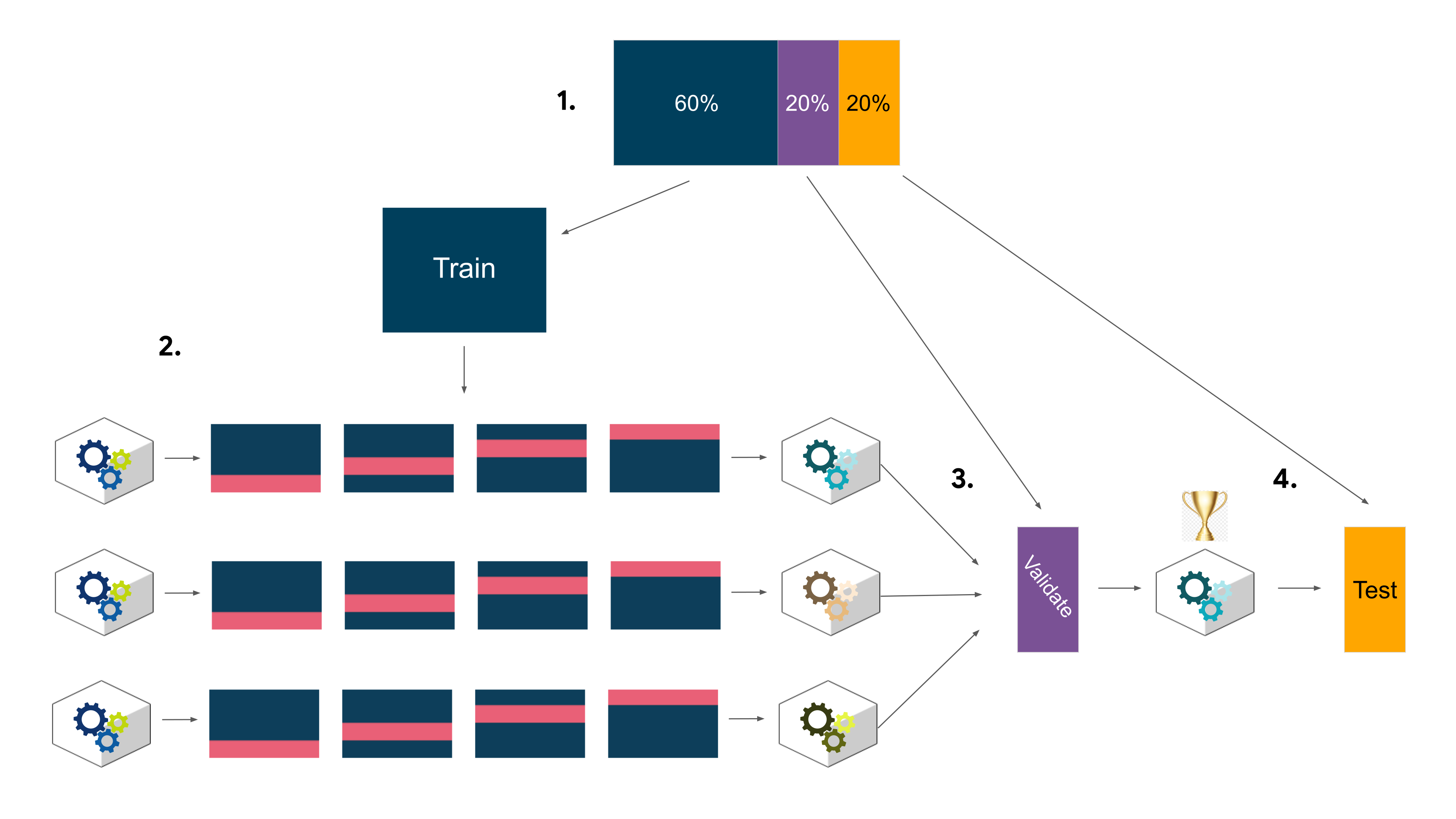
We have to import the data and process them again for the new ML model
data = pd.read_csv('tiktok_dataset.csv')

data.dropna(inplace = True)
# Handle outliers
percent25 = data['video_like_count'].quantile(0.25)
percent75 = data['video_like_count'].quantile(0.75)

iqr = percent75 - percent25
upper_limit = percent75 + 1.5*iqr

data.loc[data['video_like_count'] > upper_limit, 'video_like_count'] = upper_limit
percent25 = data['video_comment_count'].quantile(0.25)
percent75 = data['video_comment_count'].quantile(0.75)

iqr = percent75 - percent25
upper_limit = percent75 + 1.5*iqr

data.loc[data['video_comment_count'] > upper_limit, 'video_comment_count'] = upper_limit
# Check class balance
data['verified_status'].value_counts(normalize = True)*100
verified_status
not verified    93.71201
verified         6.28799
Name: proportion, dtype: float64
Feature Engineering
# Extract the length of each `video_transcription_text` and add this as a column to the dataframe

data['text_length'] = data['video_transcription_text'].apply(func = lambda text: len(text))
data.head()
| # | claim_status | video_id | video_duration_sec | video_transcription_text | verified_status | author_ban_status | video_view_count | video_like_count | video_share_count | video_download_count | video_comment_count | text_length | |
|---|---|---|---|---|---|---|---|---|---|---|---|---|---|
| 0 | 1 | claim | 7017666017 | 59 | someone shared with me that drone deliveries a... | not verified | under review | 343296.0 | 19425.0 | 241.0 | 1.0 | 0.0 | 97 |
| 1 | 2 | claim | 4014381136 | 32 | someone shared with me that there are more mic... | not verified | active | 140877.0 | 77355.0 | 19034.0 | 1161.0 | 684.0 | 107 |
| 2 | 3 | claim | 9859838091 | 31 | someone shared with me that american industria... | not verified | active | 902185.0 | 97690.0 | 2858.0 | 833.0 | 329.0 | 137 |
| 3 | 4 | claim | 1866847991 | 25 | someone shared with me that the metro of st. p... | not verified | active | 437506.0 | 239954.0 | 34812.0 | 1234.0 | 584.0 | 131 |
| 4 | 5 | claim | 7105231098 | 19 | someone shared with me that the number of busi... | not verified | active | 56167.0 | 34987.0 | 4110.0 | 547.0 | 152.0 | 128 |
# Calculate the avg text length for claims and opinions
data.groupby('claim_status')['text_length'].mean()
claim_status
claim      95.376978
opinion    82.722562
Name: text_length, dtype: float64
# Visulize the distribution of 'text_length' for claims and operations
plt.figure(figsize = (16,10))
sns.histplot(data = data, stat = 'count', multiple = 'stack', x = 'text_length', kde = False, palette = 'pastel',
            hue = 'verified_status', element = 'bars', legend = True)

plt.xlabel('Video transcription text length (number of characters)')
plt.ylabel('Count')
plt.title('Stacked Histogram of text length distribution for claim vs opinion videos')
plt.show()

Feature selection and engineering
# Create a copy of the X data
X = data.copy()

# Drop unnecessary columns
X = X[["video_duration_sec", "author_ban_status", "video_view_count", "video_share_count", "video_download_count", "video_comment_count"]]

# Encode target variable
y_encoder = OneHotEncoder(drop='first', sparse_output=False)
y = data[['claim_status']]

# Dummy encode remaining categorical values
y = pd.get_dummies(y, columns = ['claim_status'], drop_first = True)
X = pd.get_dummies(X, columns = ['author_ban_status'], drop_first = True)
X.head()
| video_duration_sec | video_view_count | video_share_count | video_download_count | video_comment_count | author_ban_status_banned | author_ban_status_under review | |
|---|---|---|---|---|---|---|---|
| 0 | 59 | 343296.0 | 241.0 | 1.0 | 0.0 | False | True |
| 1 | 32 | 140877.0 | 19034.0 | 1161.0 | 684.0 | False | False |
| 2 | 31 | 902185.0 | 2858.0 | 833.0 | 329.0 | False | False |
| 3 | 25 | 437506.0 | 34812.0 | 1234.0 | 584.0 | False | False |
| 4 | 19 | 56167.0 | 4110.0 | 547.0 | 152.0 | False | False |
X.shape
(19084, 7)
# Encode the training outcome variable
y_final = y_encoder.fit_transform(y.values.reshape(-1, 1)).ravel()

# Display the encoded training outcome variable
y_final.shape
(19084,)
Create train/validate/test sets
We choose an 80/20 train/test split
# Split the data into training and testing sets
X_train, X_test, y_train, y_test = train_test_split(X,y_final, test_size = 0.2, stratify = y_final, random_state = 0)
Then we further split the training data into training and validation sets
X_tr, X_val, y_tr, y_val = train_test_split(X_train, y_train, test_size = 0.25, stratify = y_train, random_state = 0)
split_index = [0 if x in X_val.index else -1 for x in X_train.index]
custom_split = PredefinedSplit(split_index)
Build a Random Forest model
# Instantiate the random forest classifier
rf = RFC(random_state = 0)
# Create a dictionary of hyperparameters to tune
cv_params = {'max_depth': [3,4,5, None],
             'min_samples_leaf': [1,2,3],
             'min_samples_split': [2,3,4],
             'max_features': [2,3,4],
             'n_estimators': [75, 100, 150]}
# Define a list of scoring metrics to capture
scoring = {
    'f1': 'f1',
    'recall': 'recall',
    'accuracy': 'accuracy',
    'precision': 'precision'
}

# Instantiate the GridSearchCV object
rf_cv = GridSearchCV(rf, param_grid = cv_params, cv = custom_split, scoring = scoring, refit = 'recall')
rf_cv.fit(X_train, y_train)
GridSearchCV(cv=PredefinedSplit(test_fold=array([ 0, -1, ..., -1, -1])),
             estimator=RandomForestClassifier(random_state=0),
             param_grid={'max_depth': [3, 4, 5, None],
                         'max_features': [2, 3, 4],
                         'min_samples_leaf': [1, 2, 3],
                         'min_samples_split': [2, 3, 4],
                         'n_estimators': [75, 100, 150]},
             refit='recall',
             scoring={'accuracy': 'accuracy', 'f1': 'f1',
                      'precision': 'precision', 'recall': 'recall'})
In a Jupyter environment, please rerun this cell to show the HTML representation or trust the notebook. On GitHub, the HTML representation is unable to render, please try loading this page with nbviewer.org.
GridSearchCV(cv=PredefinedSplit(test_fold=array([ 0, -1, ..., -1, -1])),
             estimator=RandomForestClassifier(random_state=0),
             param_grid={'max_depth': [3, 4, 5, None],
                         'max_features': [2, 3, 4],
                         'min_samples_leaf': [1, 2, 3],
                         'min_samples_split': [2, 3, 4],
                         'n_estimators': [75, 100, 150]},
             refit='recall',
             scoring={'accuracy': 'accuracy', 'f1': 'f1',
'precision': 'precision', 'recall': 'recall'})RandomForestClassifier(random_state=0)
RandomForestClassifier(random_state=0)
# Get the best recall score
best_recall = rf_cv.cv_results_['mean_test_recall'][rf_cv.best_index_]
print(f'Best Recall Score: {best_recall:.5f}')
Best Recall Score: 1.00000
# Examine best parameters
best_para_rf = rf_cv.best_params_
best_para_rf
{'max_depth': 3,
 'max_features': 2,
 'min_samples_leaf': 1,
 'min_samples_split': 2,
 'n_estimators': 75}
# Access the GridSearch results and convert it to a pandas df
rf_cv_results = rf_cv.cv_results_

# Examine the GridSearch results df at column `mean_test_precision` in the best index
best_precision = rf_cv_results['mean_test_precision'][rf_cv.best_index_]
print(f'Best Precision Score: {best_precision:.3f}')
Best Precision Score: 0.990
High Recall (1.0) The model is correctly identifying all actual claims in the validation set. This is crucial in a claims classification context, where missing a true claim (false negative) could lead to moderation failures or inappropriate content staying online.
High Precision (0.990) Out of all the predictions labeled as claims, 99% are actually claims. This means the model is not labeling random videos as claims, avoiding false positives that could waste moderators’ time..3f}')
Build an XGBoost model
# Instantiate the XGBoost classifier
xgb = XGBClassifier()

# Create a dictionary of hyperparameters to tune
cv_params = {
    'max_depth': [4],
    'min_child_weight': [3],
    'learning_rate': [0.1],
    'n_estimators': [5],
    'subsample': [0.7],
    'colsample_bytree': [0.7]
}

# Define a list of scoring metrics to capture
scoring = {
    'f1': 'f1',
    'recall': 'recall',
    'accuracy': 'accuracy',
    'precision': 'precision'
}

# Instantiate the GridSearchCV object
xgb_cv = GridSearchCV(xgb, param_grid = cv_params, cv = custom_split, scoring = scoring, refit = 'recall')
# Fit the model to the data
xgb_cv.fit(X_train, y_train)
GridSearchCV(cv=PredefinedSplit(test_fold=array([ 0, -1, ..., -1, -1])),
             estimator=XGBClassifier(base_score=None, booster=None,
                                     callbacks=None, colsample_bylevel=None,
                                     colsample_bynode=None,
                                     colsample_bytree=None, device=None,
                                     early_stopping_rounds=None,
                                     enable_categorical=False, eval_metric=None,
                                     feature_types=None, feature_weights=None,
                                     gamma=None, grow_policy=None...
                                     missing=nan, monotone_constraints=None,
                                     multi_strategy=None, n_estimators=None,
                                     n_jobs=None, num_parallel_tree=None, ...),
             param_grid={'colsample_bytree': [0.7], 'learning_rate': [0.1],
                         'max_depth': [4], 'min_child_weight': [3],
                         'n_estimators': [5], 'subsample': [0.7]},
             refit='recall',
             scoring={'accuracy': 'accuracy', 'f1': 'f1',
                      'precision': 'precision', 'recall': 'recall'})
In a Jupyter environment, please rerun this cell to show the HTML representation or trust the notebook. On GitHub, the HTML representation is unable to render, please try loading this page with nbviewer.org.
GridSearchCV(cv=PredefinedSplit(test_fold=array([ 0, -1, ..., -1, -1])),
             estimator=XGBClassifier(base_score=None, booster=None,
                                     callbacks=None, colsample_bylevel=None,
                                     colsample_bynode=None,
                                     colsample_bytree=None, device=None,
                                     early_stopping_rounds=None,
                                     enable_categorical=False, eval_metric=None,
                                     feature_types=None, feature_weights=None,
                                     gamma=None, grow_policy=None...
                                     missing=nan, monotone_constraints=None,
                                     multi_strategy=None, n_estimators=None,
                                     n_jobs=None, num_parallel_tree=None, ...),
             param_grid={'colsample_bytree': [0.7], 'learning_rate': [0.1],
                         'max_depth': [4], 'min_child_weight': [3],
                         'n_estimators': [5], 'subsample': [0.7]},
             refit='recall',
             scoring={'accuracy': 'accuracy', 'f1': 'f1',
'precision': 'precision', 'recall': 'recall'})XGBClassifier(base_score=None, booster=None, callbacks=None,
colsample_bylevel=None, colsample_bynode=None,
colsample_bytree=None, device=None, early_stopping_rounds=None,
enable_categorical=False, eval_metric=None, feature_types=None,
feature_weights=None, gamma=None, grow_policy=None,
importance_type=None, interaction_constraints=None,
learning_rate=None, max_bin=None, max_cat_threshold=None,
max_cat_to_onehot=None, max_delta_step=None, max_depth=None,
max_leaves=None, min_child_weight=None, missing=nan,
monotone_constraints=None, multi_strategy=None, n_estimators=None,
n_jobs=None, num_parallel_tree=None, ...)XGBClassifier(base_score=None, booster=None, callbacks=None,
colsample_bylevel=None, colsample_bynode=None,
colsample_bytree=None, device=None, early_stopping_rounds=None,
enable_categorical=False, eval_metric=None, feature_types=None,
feature_weights=None, gamma=None, grow_policy=None,
importance_type=None, interaction_constraints=None,
learning_rate=None, max_bin=None, max_cat_threshold=None,
max_cat_to_onehot=None, max_delta_step=None, max_depth=None,
max_leaves=None, min_child_weight=None, missing=nan,
monotone_constraints=None, multi_strategy=None, n_estimators=None,
n_jobs=None, num_parallel_tree=None, ...)# Examine best recall score
best_recall_xgb = xgb_cv.cv_results_['mean_test_recall'][xgb_cv.best_index_]
print(f'Best Recall Score: {best_recall_xgb:.5f}')
Best Recall Score: 0.99683
# Access the GridSearch results and convert it to a pandas df
xgb_cv_results = xgb_cv.cv_results_

# Examine the GridSearch results df at column `mean_test_precision` in the best index
best_precision = xgb_cv_results['mean_test_precision'][xgb_cv.best_index_]
print(f'Best Precision Score: {best_precision:.3f}')
Best Precision Score: 0.957
Apply the Random Forest model for prediction
# Use the random forest "best estimator" model to get predictions on the validation set
rf_model = rf_cv.best_estimator_
y_pred_rf = rf_model.predict(X_val)
print(y_pred_rf)
[0. 1. 0. ... 0. 0. 0.]
To evaluate the predicted and validation values, we use a confusion matrix
# Create a confusion matrix to visualize the results of the classification model
# Compute values for confusion matrix
cm = confusion_matrix(y_val, y_pred_rf)

# Create display of confusion matrix using ConfusionMatrixDisplay()
disp = ConfusionMatrixDisplay(confusion_matrix = cm)

# Plot confusion matrix
disp.plot()

# Display plot
plt.show()

# Create a classification report
# Create classification report for random forest model
report = classification_report(y_val, y_pred_rf)
print(report)
              precision    recall  f1-score   support

         0.0       1.00      0.99      0.99      1922
         1.0       0.99      1.00      0.99      1895

    accuracy                           0.99      3817
   macro avg       0.99      0.99      0.99      3817
weighted avg       0.99      0.99      0.99      3817
The random forest model performs exceptionally well with 99% accuracy, precision, recall, and F1-score for both classes. It reliably distinguishes between claims and opinions.
Confusion Matrix Insight: Very few misclassifications occurred, indicating the model makes highly accurate predictions with minimal false positives or negatives.
Apply the XGBoost model for prediction
# Use the best estimator to predict on the validation data
xgb_model = xgb_cv.best_estimator_
y_pred_xgb = xgb_model.predict(X_val)
# Compute values for confusion matrix
cm = confusion_matrix(y_val, y_pred_xgb)

# Create display of confusion matrix using ConfusionMatrixDisplay()
disp = ConfusionMatrixDisplay(confusion_matrix = cm)

# Plot confusion matrix
disp.plot()

# Display plot
plt.show()

# Create a classification report
report = classification_report(y_val, y_pred_xgb)
print(report)
              precision    recall  f1-score   support

         0.0       1.00      0.96      0.98      1922
         1.0       0.96      1.00      0.98      1895

    accuracy                           0.98      3817
   macro avg       0.98      0.98      0.98      3817
weighted avg       0.98      0.98      0.98      3817
The XGBoost model performs nearly identically to the random forest model, with 99% accuracy, precision, recall, and F1-score. It made slightly fewer false positives, suggesting marginally better precision, but both models are highly reliable.
Subsequently, we use the champion model to predict on test data
test_pred = xgb_model.predict(X_test)
# Compute values for confusion matrix
cm = confusion_matrix(y_test, test_pred)

# Create display of confusion matrix using ConfusionMatrixDisplay()
disp = ConfusionMatrixDisplay(confusion_matrix = cm)

# Plot confusion matrix
disp.plot()

# Display plot
plt.show()

We can visualize the features' importance of the champion level
plot_importance(xgb_cv.best_estimator_)
<Axes: title={'center': 'Feature importance'}, xlabel='Importance score', ylabel='Features'>

The most predictive features were video_share_count and video_view_count, followed by video_download_count and video_comment_count. This suggests that user engagement metrics are highly indicative of whether a video contains a claim. The results are not surprising, as content that generates more interaction is more likely to include assertive or controversial statements.
5. Conclusion
To conclude, this projectct applied an end-to-end data analytics and machine learning pipeline to understand content behavior on TikTok and to predict whether a video is classified as a claim or an opinion. Starting from exploratory data analysis, we identified strong skewness, heavy tails, and substantial heterogeneity in engagement metrics such as views, likes, shares, and downloads. These observations motivated careful feature engineering, robustness checks, and the use of models capable of capturing non-linear relationships rather than relying solely on classical statistical assumptions.
Through hypothesis testing, we established that verified and unverified users exhibit statistically significant differences in engagement patterns, particularly in video view counts. This result provided both behavioral insight and empirical justification for incorporating account-level attributes—such as verified_status and author_ban_status—into predictive models. The robustness checks using non-parametric tests ensured that our conclusions were not driven by extreme viral outliers, reinforcing the reliability of the analytical foundation before moving into machine learning.
Building on this foundation, Decision Tree and XGBoost models were employed to classify claim status. These models proved especially suitable due to their ability to handle skewed data, interaction effects, and complex feature dependencies. Feature importance analysis revealed that engagement-related variables (views, shares, likes) and account attributes play a dominant role in classification performance, highlighting how behavioral signals can be leveraged to distinguish potentially misleading content from opinion-based videos. In particular, tree-based models provided both strong predictive performance and interpretability, allowing us to identify which features most influence model decisions.
Overall, this project demonstrates how combining EDA, statistical testing, feature engineering, and machine learning can produce both actionable insights and robust predictive systems. The results underscore the importance of feature-driven modeling in content moderation tasks and suggest that interpretable ML models like Decision Trees and XGBoost can serve as powerful tools for supporting trust, safety, and responsible AI deployment on social media platforms. king.